PiControl Solutions
Menu

PiAbsorb

Request More InFo

Real-Time Packed Absorption Column Simulator

PiAbsorb is an advanced, interactive chemical engineering simulator that models a packed gas-absorption column in real time. The simulator replicates the behaviour of a bench-scale column in which carbon dioxide (CO₂) is absorbed from an air/CO₂ gas mixture into a counter-current water stream, a fundamental unit operation in chemical and environmental engineering.

(Get immediately PiAbsorb and practice distillation process on a computer)

info@PiControlSolutions.com, Tel: (832) 495 643

Click on Schedule a Demo to download and to examine a full-blown demo of piAAbsorb.

Schedule A Demo
piAbsorb-absorption-column
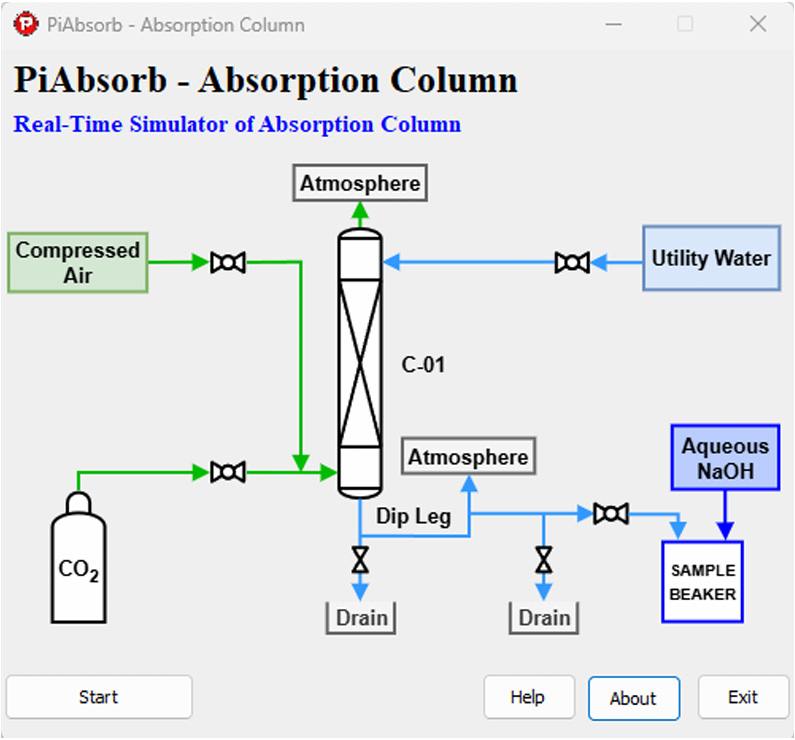
Figure 1. PiAbsorb - Absorption Column

Users manipulate three independent feed streams (water, air, and CO₂) via hand-control valves and observe the immediate effects on column flooding, outlet pH, and absorption efficiency. All process variables update continuously, giving the feel of operating a real instrument panel rather than running a static textbook calculation.

Developed by PiControl Solutions LLC, PiAbsorb is used by universities and colleges to support courses in mass transfer, separation processes, unit operations, and process control, and can run equally well as a standalone desktop application or as part of a virtual laboratory.

Schedule A Demo

Key Features

  • Real-Time Simulation: Physics engine updates every second. All instruments respond dynamically to changes in valve settings, just as in a physical laboratory.
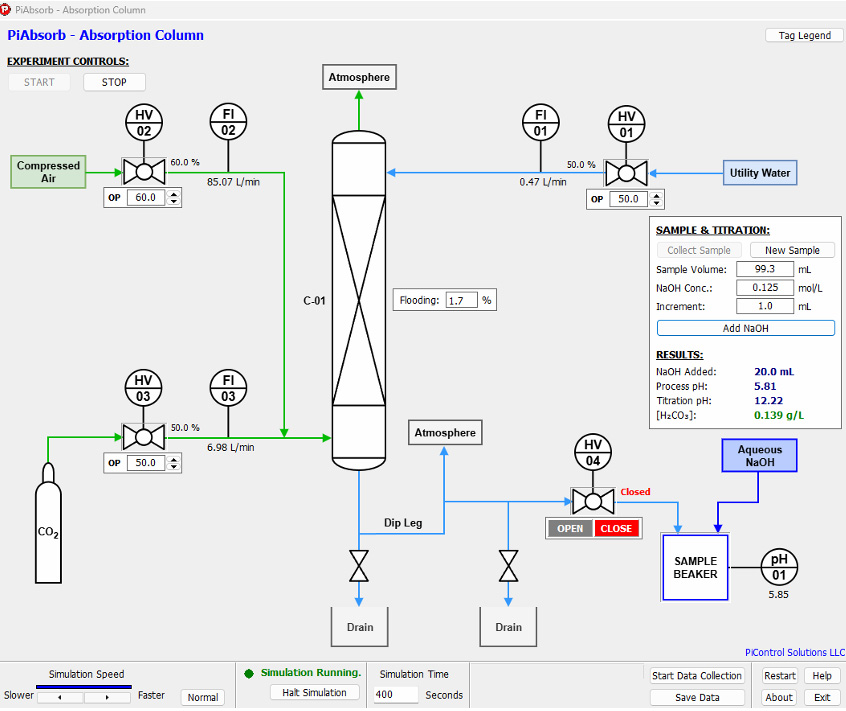
  • Three Independent Feed Streams: Separate control valves for water (HV-01), air (HV-02), and CO₂ (HV-03) allow independent manipulation of liquid and gas compositions and flow rates.
  • Live Process Instruments: FI-01 (water flow, L/min), FI-02 (air flow, L/min), FI-03 (CO₂ flow, L/min), FL-01 (flooding percentage, %), and pH-01 (outlet liquid pH) update continuously on the main process diagram.
  • Flooding Indicator: Empirical flooding correlation calculates column loading (%) from liquid and gas flows. A colour-coded indicator warns when the column approaches flood.
  • Real-Time Trend Charts: Separate chart panels display time histories of flow rates and outlet pH. Charts scroll automatically and can be zoomed for detailed analysis.
  • Virtual Titration Panel: Users collect a liquid sample at any time, then perform a simulated acid-base titration (NaOH vs. carbonic acid) to determine dissolved CO₂ concentration, replicating a standard wet-chemistry procedure.
  • Data Logging & CSV Export: All process variables are logged at every simulation step and can be exported to a comma-separated values (CSV) file for post-processing in Excel or Python.
  • Configurable INI File: Key physical and instrument parameters (time constants, max flow rates, flooding coefficients, Henry’s Law constant, NTU coefficient) are stored in a plain-text INI file, allowing instructors to recalibrate the model without recompiling the software.
  • No Internet Connection Required: Installs and runs entirely on a Windows PC. No licence server or cloud dependency, and no student data ever leaves the local machine.
Schedule A Demo

Process Diagram & Instruments

The main window displays a P&ID-style process diagram of the absorption column. Each instrument tag corresponds to a live measurement; valve positions are adjusted with on-screen sliders.

experimental-control
Figure 2. PiAbsorb main process diagram – P&ID view with live instrument readings
TagDescriptionUnitTypical Range
HV-01Water feed control valve%0 – 100
HV-02Air feed control valve%0 – 100
HV-03CO₂ feed control valve%0 – 100
FI-01Water volumetric flow rateL/min0 – 0.95
FI-02Air volumetric flow rateL/min0 – 141.6
FI-03CO₂ volumetric flow rateL/min0 – 14.0
FL-01Column flooding percentage%0 – 100+
pH-01Outlet liquid pH4.5 – 7.0 (typical)

Virtual Titration Panel

A unique feature of PiAbsorb is its built-in titration experiment. At any point during the simulation, the user can:

  • Click Collect Sample to take a 100 mL (± 5%) liquid sample from the column outlet.
  • Enter the NaOH titrant concentration and initial volume in the titration panel.
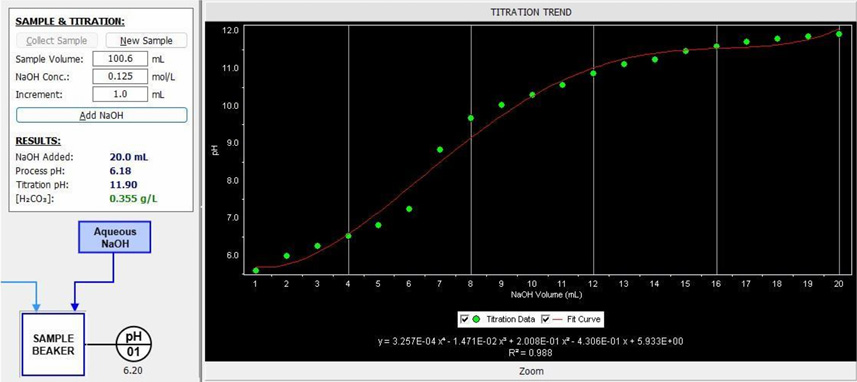
  • Add NaOH in configurable increments (default 1.0 mL per step) and observe the pH response curve.
  • Identify the equivalence point and back-calculate the dissolved CO₂ concentration in the sample.
  • Compare the titration result to the pH-01 reading and the simulation model prediction.

The titration panel replicates a real wet-chemistry procedure without any consumables, waste, or hazard. It bridges the gap between digital simulation and hands-on analytical chemistry.

Real-Time Trends & Data Export

PiAbsorb continuously logs and plots key process variables. Real-time scrolling trend charts are provided for:

  • Flow rates: FI-01 (water), FI-02 (air), and FI-03 (CO₂) on the same axis
  • Titration panel

All data can be exported to a CSV file at any time. The export includes a timestamped header and columns for each instrument tag, making it straightforward to import into Excel, MATLAB, or Python for further analysis and comparison against theoretical calculations.

Who Is It for?

  • Chemical Engineering Students: Visualise and experiment with mass transfer theory studied in unit operations and separation processes courses. No physical equipment required.
  • Process Engineers & Technicians: Use the simulator for preliminary troubleshooting of industrial absorption and scrubbing systems, or to explore the effect of operating parameter changes before implementing them on a real plant.
  • Educators & Instructors: Design structured experiments, set target operating conditions, and demonstrate flooding, L/G ratio effects, and pH response live in front of a class.
  • Researchers: Validate mass transfer correlations, explore model parameters, and generate synthetic datasets for comparison with experimental data.

Benefits

  • Hands-On Without the Hazards: CO₂ absorption experiments involve pressurised gas cylinders and chemical waste. PiAbsorb eliminates all associated risks while preserving the learning value.
  • Cost-Effective: No equipment, consumables, or maintenance costs. A single software licence supports an entire class of students simultaneously.
  • Flexible & Repeatable: Students can reset the simulator instantly and repeat experiments as many times as needed, something that would be impossible with a physical column on a shared laboratory schedule.
  • Accessible Anywhere: Runs on any Windows PC. Students can continue their work at home, in the library, or remotely, making it ideal for hybrid and online delivery.
  • Instructor Customisable: The plain-text INI configuration file lets instructors adjust physical parameters to create different ‘column’ scenarios without modifying source code.
  • Industry 4.0 Ready: Simulates an operator station experience, preparing students for the digital process environments found in modern chemical plants and refineries.

System Requirements

Component

Requirement

Operating System

Windows 10 or Windows 11 (64-bit recommended)

Processor

1 GHz or faster (Intel/AMD)

Memory

512 MB RAM minimum; 2 GB recommended

Display

1280 × 720 or higher resolution

Storage

50 MB free disk space

Additional Software

Microsoft Visual C++ Redistributable (included in installer)

Internet Connection

Not required for normal operation

Available Documentation

  • User Manual: Step-by-step guide to all simulator features: startup, instrument overview, running experiments, data export, and configuration.
  • Case Study: Four guided laboratory tasks covering flooding, L/G ratio, absorption efficiency, and dynamic response, with pre-lab questions, data tables, and post-lab analysis prompts.
  • Configuration Reference: Description of every parameter in PiAbsorbConfig.INI with units, default values, and guidance for customisation.

Get PiAbsorb

Request a demo, ask about pricing, or schedule an online walkthrough.


magnifiercrossmenu